Plans and limits
What Free, Launch and Agency really include, and the only two things Uruvak counts — connected stores and Live Publishes.
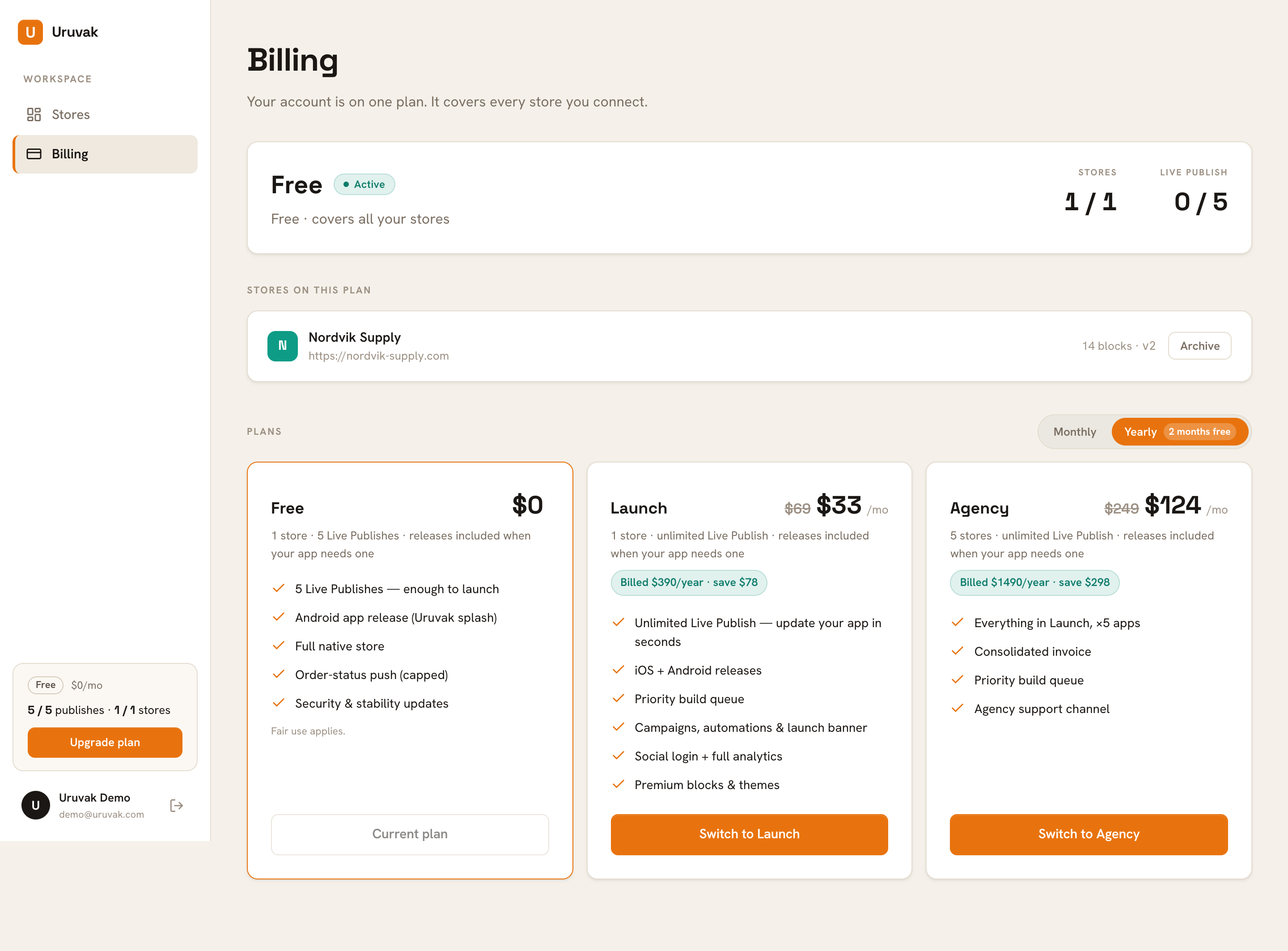
Uruvak bills your account, not your apps. One plan covers every store you connect, so five stores on Agency is still one subscription and one invoice. Open Billing in the dashboard sidebar to see where you stand. Only two numbers on that page are metered: how many stores you can run, and how many times you can Live Publish. Everything else — blocks, themes, releases, push, analytics — is not counted.
The three plans#
| Free | Launch | Agency | |
|---|---|---|---|
| Monthly | $0 | $39/month | $149/month |
| Yearly | — | $390/year | $1490/year |
| Stores | 1 | 1 | 5 |
| Live Publish | 5, for the lifetime of the account | Unlimited | Unlimited |
Yearly is ten months' price for twelve. The Yearly tab carries a green "2 months free" chip and is the one selected when the page opens. In that view each card shows a rounded monthly equivalent — $33/mo for Launch, $124/mo for Agency — with a green pill underneath reading "Billed $390/year · save $78". The rounded figure is a comparison, not a charge: yearly bills the annual total once.
Stores: one WooCommerce site, one app#
A "store" in Uruvak is one connected WooCommerce site, which is one mobile app. Free and Launch each include one. Agency includes five, and all five sit on the same subscription.
You cannot create a store from the dashboard. There is no form anywhere to type a shop URL into, and Add a store only scrolls you down to the install instructions. Stores arrive one way: you install the Uruvak Bridge plugin on WordPress and press Connect with Uruvak → there. See Connect your store to Uruvak.
That matters for your plan, because you meet the store limit at the very end of that flow rather than at the start of it. You install the plugin, you get sent to Uruvak to approve the link, and the approval screen answers in red:
Store limit reached (1/1). Upgrade your plan to add more stores.
Archived stores do not count against the limit, so you can make room without losing anything. Archiving lives on the Billing page — see Upgrading, downgrading and cancelling.
Live Publishes: what spends one, and what doesn't#
A Live Publish sends your current draft — layout, blocks, colors, fonts, product choices, wording — to every shopper who already has your app. They see it the next time they open it. Nobody downloads anything.
One Live Publish is spent when you press Publish Live and the publish succeeds. That is the only thing that spends one.
None of these cost you a publish:
- Editing. There is no Save button in the Studio. Your draft saves itself and the top bar reads "Draft saved".
- A publish that fails. Your allowance is checked before Uruvak contacts your shop, and only counted once the push has gone through. If your shop is unreachable you get an error and keep the publish.
- Undoing a publish. The one-step rollback is always free.
- Taking a release. Building the Android APK is a separate thing entirely — see Take a release.
That counter also survives a subscription. If you upgrade to Launch, publish forty times, and later cancel back to Free, you land on Free with zero publishes left — not five. Nothing you do while paying refills the free allowance.
The same number is shown four different ways#
This trips people up, so read the label rather than the number:
| Where you see it | It reads like | It means |
|---|---|---|
| Sidebar plan card | 3 / 5 publishes | publishes left |
| Billing, under "Live Publish" | 2 / 5 | publishes used |
| Store Settings › General, "Plan & usage" | 2 / 5 used | publishes used |
| Dashboard home tile | a big 3, over "of 5 free publishes left" | publishes left |
| Studio top bar | Publish Live · 3 left | publishes left |
On a paid plan all of these read "Unlimited" or an infinity sign.
Two things that look like plan limits but are not#
Before your first release, Publish Live is switched off. On a brand-new app the button is greyed out and tells you: "Take your first app release to unlock Live Publish." That is not a plan limit — it applies on Agency too. Take the release first, then Live Publish works for good. See Take a release.
A release is refused when nothing needs one. If the Release Android app (APK) button is disabled with "Nothing changed that needs a release. Publish live instead — it's instant.", your plan is fine. You have simply changed something that goes live without a rebuild.
Releases are not numbered — but Free has a quiet backstop#
Every plan card says "releases included when your app needs one", and no plan shows a release count. A release is only needed when the app icon, the app name, the package name or the push notification file changes. Everything else reaches shoppers through Live Publish.
On Free there is an unadvertised fair-use limit on rebuilds after your first release, and it is counted across all of your stores rather than per store. The only warning is one line on the release confirmation:
Heads up — this is your last included release on the free plan.
Past that, Settings › Releases answers in red:
The free plan includes everything you need to launch — you've used your included releases. Upgrade to keep releasing.
What the plan cards promise that Uruvak cannot do yet#
The feature lists on the plan cards and on the pricing page run ahead of what is built. These are the ones worth knowing before you pay for them:
So, honestly: paying buys you unlimited Live Publish, a fifth store on Agency, and a higher place in the build queue when a release is queued. If you are launching one shop and expect to update it rarely, Free is a real plan and your app keeps running forever on it.
When you are ready to move between plans, Upgrading, downgrading and cancelling walks through checkout, what a downgrade waits for, and how to undo one.